Help Center & FAQ
Frequently Asked Questions
Is there a free plan?
Yes! We offer a free plan with basic features, plus paid plans (Pro and Premium) for advanced functionality.
How do I get started?
Simply sign up with your Google™ account to get started immediately. No credit card required for the free plan.
Is Meet Registrations the same as Zoom Webinars?
No. Unlike Zoom Webinars and Zoom Meetings with registration, Google Meet™ does not offer a way to create a registration page for your event.
That's where Meet Registrations comes in. Meet Registrations is a tool to help you manage your Google Meet™ events by adding professional features like a registration page for your event.
How is this different from other event management tools?
Meet Registrations is specifically designed for Google Meet™ events, with seamless integration and emails sent from your own Gmail™ account for better deliverability.
What are these authentication scope errors?
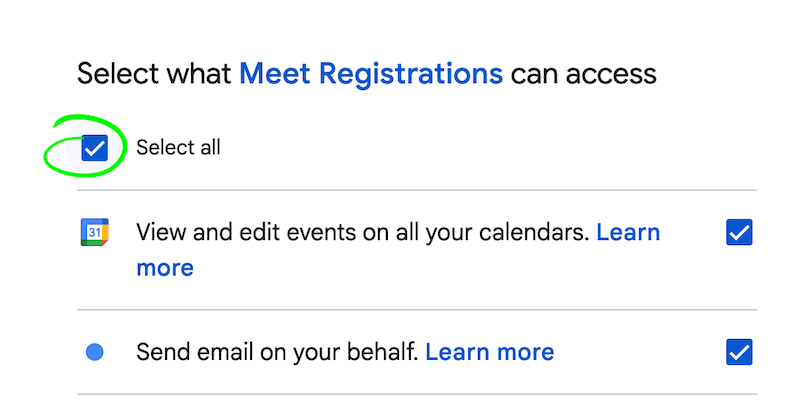
Meet Registrations uses your Google™ account to access your calendar and send emails. When you sign up/sign in, you will be asked to grant access to your calendar and send emails.
If you didn't check the Select all option, Meet Registrations will not be able to access your calendar and send emails to registrants. You need to sign out and sign in again to grant access to your calendar and send emails during the Google™ sign in:
Need Help?
We're here to help! Get in touch with our support team or find answers to common questions below.